How to add coupons to email and SMS
Last updated: March 18, 2025
Overview
Unique coupons are a great way to avoid coupon abuse and give customers a personalized discount. Read on to learn how to insert unique coupon codes into email and SMS messages!
Before getting started
Upload a custom coupon collection or generate codes from a Shopify discount.
Add coupon codes to email
Coupon codes can be displayed in any heading or text block in a Campaign or Automation Email. To insert a snippet that will render as a unique coupon code to each contact:
Place your cursor where you want your coupon to appear
In the visual builder, click the three-dot icon; in the plain text builder, click the lightning bolt icon
Click the coupon icon
Search for the coupon
Select or search for the coupon
Click Preview to see how the coupon code will appear to your Contacts!
Previewing a coupon code will not use a code, but sending a test email will. Check out our guide to replenishing an existing coupon collection to learn how to add more unique codes to a coupon collection.
Add coupon codes to SMS
Coupon codes can be displayed in any Campaign or Automation SMS message. To insert a snippet that will display a unique coupon code to each Contact:
Place your cursor where you want your coupon to appear
Click the Coupon icon
Select or search for the coupon collection
Troubleshooting
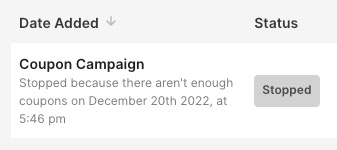
Why did my campaign stop sending?
If your coupon collection does not have enough coupon codes left to send to each contact in the campaign's audience, the campaign will not go out to any contacts. Replenish your coupon collection and send the campaign again.