Collect SMS consent with custom opt-in keywords
Last updated: March 12, 2025
Overview
Opt-in keywords allow contacts to subscribe to your brand’s SMS marketing messages by texting a keyword to your toll-free number. Keywords can be used as surveys or quizzes to collect information on contacts' preferences.
Read on to learn how to create keywords, which words can't be used as keywords, and advice on legal language to include anywhere you advertise keywords.
Choose a keyword
Keywords should be short, memorable, and relevant to your brand.
The following words cannot be used as custom keywords:
JOIN | JOINSMS | JOINMMS |
JOIN2x | STOP | HELP |
UNSTOP | SUBSCRIBE | OPTIN |
YES | Y | STOP |
NO | N |
Create a keyword
Create as many opt-in keywords as you need! Opt-in keywords are not case sensitive.
To create a new keyword:
Click the Settings icon
Click SMS
Click + Keyword
Enter a keyword in the Keyword field
Select a List that is used as a trigger in an Automation containing SMS to add Contacts who use the keyword to
Click Create
Create a pre-populated opt-in keyword link
Open any campaign or automation email in the email builder and click the content tab to get started.
Drag an HTML block into your email
In the HTML window that appears, delete the Insert HTML Here placeholder text
Paste the following HTML snippet in the HTML window:
<a href="sms:VAR_SMS_PHONE?&body=Send%20this%20text%20to%20subscribe%20to%20SMS%20Updates!VAR_SMS_JOIN">
    Text us to sign up for SMS updates!
</a>
Change Text us to sign up for SMS updates! to whatever you'd like to display in the email and include an opt-in keyword to add contacts to specified lists!
Delete a keyword
To delete an opt-in keyword, click the trash can icon next to the keyword > Delete Keyword.
Deleted keywords will not pass consent to receive SMS marketing materials from contacts to Sendlane.
Legal language for opt-in keywords
This section is for informational purposes only and is not intended to provide legal advice. Contact your attorney to obtain advice with respect to any particular question.
As soon as your opt-in keyword is saved and associated with a list used in an automation, it is ready to start collecting SMS marketing consent opt-ins. Before adding your opt-in keyword to emails, social media, or print assets, make sure you have consent language ready to go.
To prevent potential fines and service interruptions, include legal consent language wherever you advertise your SMS program with opt-in keywords. Both web-based and print materials advertising your SMS program must contain legal consent language.
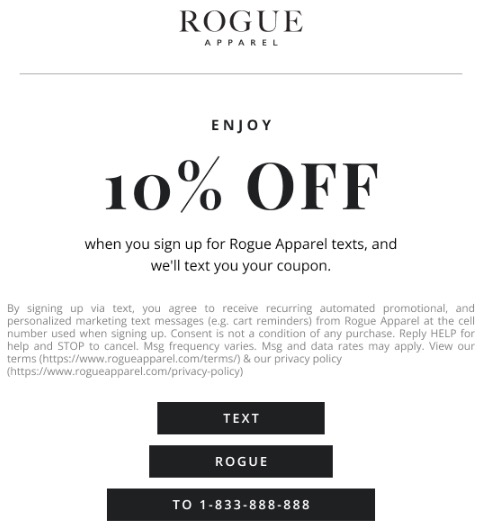
Here is an example of an email that provides the proper legal language while advertising the opt-in keyword:
Printed or static images
Use the following legal copy for printed materials and static images.
Replace the bolded variables with your business' information.
By signing up via text, you agree to receive recurring automated promotional and personalized marketing messages (e.g. cart reminders) from [Business Name] at the cell number used when signing up. Consent is not a condition of any purchase. Reply HELP for help and STOP to cancel. Msg frequency varies. Msg & data rates may apply. View Terms & Privacy at [Terms of Service URL] and [Privacy Policy URL].
Web-based advertising
Use the following legal copy for web content.
Replace the bolded variables with your business' information.
By signing up via text, you agree to receive recurring automated promotional and personalized marketing messages (e.g. cart reminders) from [Business Name] at the cell number used when signing up. Consent is not a condition of any purchase. Reply HELP for help and STOP to cancel. Msg frequency varies. Msg & data rates may apply. View Terms [Hyperlinked Terms Page] & Privacy [Hyperlinked Privacy Page].