Segment conditions and options
Last updated: July 17, 2025
Overview
Segment conditions and options are generally shared by both the segment builder and conditional splits.
This guide details each available conditions and options that determine your segment or conditional split.
Segment vocabulary
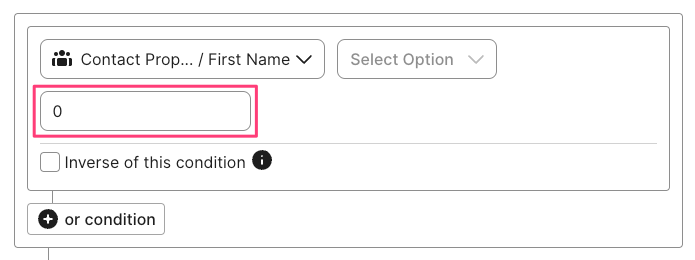
Segments are dynamic collections of contacts based on selected conditions and options, and the value you enter.
Conditions are the type of data being used to create segments, such as average order value, subscription date, or sign-up source.
Options are instructions that tell the segment how to use the data provided by the selected option, such as is, contains, or exists.
Values are the inputs you enter into the segment builder's value field or select from a list:
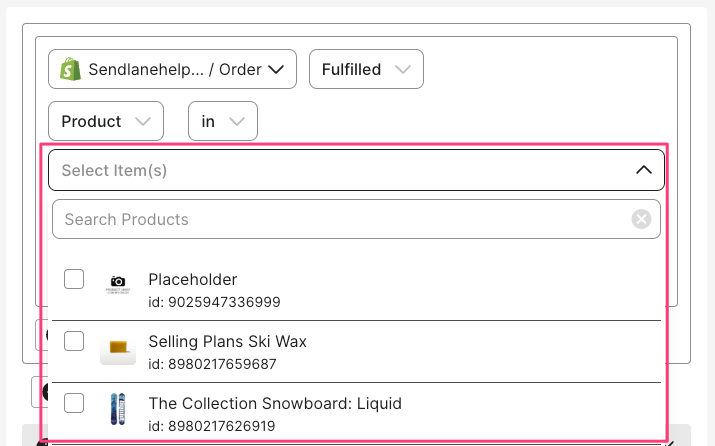
In the Sendlane segment builder, conditions are separated into categories to make browsing easier:
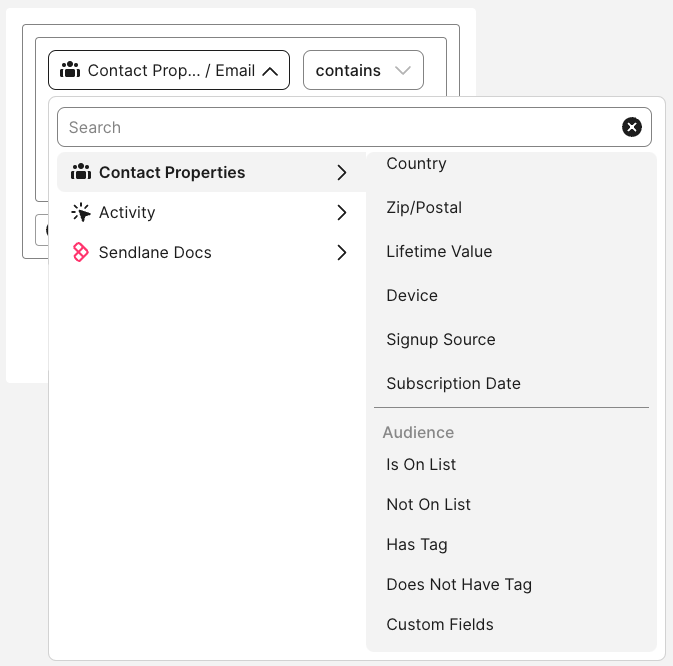
See the sections below to explore the segment builder's available conditions!
Condition data types
Options enable a variety of conditions depending on the data provided by the condition. There are four types of data that a condition can support. This section lists each data type and its corresponding options.
String
String type conditions are made of plain text, such as email addresses, names, and text based custom fields. The following operators are available for string data, though not all conditions support all operators:
Is - The text or date set for the selected condition exactly matches the text entered in the value field
Not - The text or date set for the selected condition does not exactly match the text entered in the value field
Contains - The text or date set for the selected condition contains all of the text entered in the value field
Does not contain - The text or date set for the selected condition does not contain all of the text entered in the value field
Starts with - The text or date set for the selected condition starts with the text entered in the value field
Ends with - The text or date set for the selected condition ends with the text entered in the value field
In - The text or date set for the selected condition matches at least one comma separated value entered in the value field
Not in - The text or date set for the selected condition does not match at least one comma separated value entered in the value field
Number
Number type conditions are made of integers, such as the lifetime value of a contact or number of orders placed.
Is equal to - The number set for the selected condition is equal to the number entered in the value field
Is greater than - The number set for the selected condition is greater than the number entered in the value field
Is less than - The number set for the selected condition is less than the number entered in the value field
Date
Date type conditions are made of dates, such as the date entered for a contact's birthday custom field or the date an order was placed.
Is on - The date set for the selected condition matches the date entered in the value field
Is before - The date set for the selected condition is before the date entered in the value field
Is after - The date set for the selected condition is after the date entered in the value field
In the last - The date set for the selected condition is in the last X days or months before the date entered in the value field
Not in the last - The date set for the selected condition is not in the last X days or months before the date entered in the value field
Before the last - The date set for the selected condition predates the last X months or days
Contact Properties
These properties are pulled from a contact's profile in Sendlane.
See the custom field section below for information on creating segments using custom fields in contact profiles!
General properties
Use caution when selecting location based segment conditions
Segmenting by location depends heavily on your business operations.
Make sure to read the descriptions of each location option carefully.
If you ship products, your best bet is to use a line from your customers' shipping locations using your eCommerce integration's Segmentation options instead of the address data in the Contact Properties section.
Condition | Type | Description |
String | Contact email address | |
First Name | String | Contact first name |
Last Name | String | Contact last name |
Phone | Number | Contact's phone number's digits |
Email consent | Selection | Contact's email subscription status |
SMS consent | Selection | Contact's SMS subscription status |
Country | String | Country stored in contact's profile |
Zip/Postal | Number | Zip code stored in the contact's profile |
Lifetime Value | Number | Lifetime value of a contact across all stores in an account. Values must be entered with a decimal place and cents ( |
Device | Selection | Contact device used |
Signup Source | Selection | Contact opt-in type |
Audience
Options | Type | Description |
Is On List | Selection | Contacts who are on selected lists |
Not On List | Selection | Contacts who are not on selected lists |
Has Tag | Selection | Contacts with selected tags applied to profile |
Does Not Have Tag | Selection | Contacts without selected tags applied to profile |
Custom Field | String for text based custom fields; date for date based custom fields | Contacts whose custom field value matches selected conditions |
Activity
All activity conditions are selection types.
Options | Description |
Opened | Contact opened Campaign or Automation email |
Did Not Open | Contact did not open Campaign or Automation |
Clicked | Contact clicked link within Campaign or Automation email or SMS |
Did Not Click | Contact did not click link within Campaign or Automation email or SMS message |
Triggered Event | Contact triggered custom event |
Did Not Trigger Event | Contact did not trigger custom event |
Visited Site | Contact visited specified site |
Not Visited Site | Contact did not visit specified site |
Did Reply | Contact replied to selected SMS message |
Did Not Reply | Contact did not reply to selected SMS message |
Sent | Contact was sent selected email or SMS message |
Last Site Visit | Contacts whose last site visit matches selected date conditions |
Not Last Site Visit | Contacts whose last site visit does not match selected date conditions |
Last Product View | Contacts whose last product viewed matches selected products |
Not Last Product View | Contacts whose last product viewed does not match selected products |
Last Added To Cart | Contacts whose last product added to cart matches selected products |
Not Last Added To Cart | Contacts whose last product added to cart does not match selected products |
Is In Automation | Contacts who are currently in selected automations |
Is Not In Automation | Contacts who are not currently in selected automations |
Signup By Form | Contacts who signed up via selected forms |
Not Signup By Form | Contacts who did not sign up via selected forms |
Reviews
To see Reviews Segment options:
Select your eCommerce provider from the Options dropdown
Select your store
Select Reviews
Select a review type
Submitted Review - All reviews are in scope, including reviews without photos
Submitted Review With Photo - Only reviews with photos are in scope
Options | Description |
Has Any | Contact meets the criteria for the Submitted selection |
Does not have any | Contact does not meet the criteria for the Submitted selection |
Number of Reviews | Specify the number of reviews left by the Contact |
Rating | Specify the star rating given in the review |
Submitted date | Specify a review submission date or date range |
Product(s) | Specify product(s) reviewed |
Shopify
Customer Data
Contacts must have made a purchase to be counted in Shopify Customer segments
Review the table below for information on filters available on customer data from your Shopify store.
Filters marked with an asterisk(*) can use the following time constraints to only return contact profiles who completed/did not complete the selected action during the selected time constraint period:
All time
is on (selected date)
is before (selected date)
is after (selected date)
in the last (selected timeframe)
before the last (selected time frame)
between (selected dates)
If no time constraint is selected, the segment will default to all time.
Filter | Notes |
Exists | Customer exists in your Shopify store's database |
Total Spend* | Customer's total amount spent in your Shopify store |
Average Order Value | The average value of orders in your Shopify store |
Number of Orders* | The number of orders the customer has placed in your Shopify store |
Country | Country entered in contact's profile in your Shopify store |
State/Province | State/province entered in contact's profile in your Shopify store |
City | City entered in contact's profile in your Shopify store |
Verified Email | Whether the customer's email has been verified or not for your Shopify store |
Accepts Marketing* | Whether the customer has given consent to receive marketing emails or not from your Shopify store (see Email Consent for more information) |
Customer Since | Use date parameters to select a window in which the Contact became a customer by placing an order or creating an account with your Shopify store |
Tag | Use parameters to select Shopify tags |
Order Data
Order data can be filtered by one of the following order statuses (review your Shopify store's setup to determine which status makes the most sense for your segment):
Any
Fulfilled
Partially Fulfilled
Unfulfilled
Returned/Restocked
Review the table below for information on filters available on order data from your Shopify store.
Filters marked with an asterisk(*) can use the following time constraints to only return contact profiles who made an order during the selected time constraint period:
All time
is on (selected date)
is before (selected date)
is after (selected date)
in the last (selected timeframe)
before the last (selected time frame)
between (selected dates)
If no time constraint is selected, the segment will default to all time.
Filter | Notes |
Exists | Order exists in your Shopify store's database |
Does Not Exist | Order does not exist in your Shopify store's database |
Product* | Product associated with or not associated with order |
Product Collection* | Product Collection associated with or not associated with order |
Product Tag* | Product Tag associated with or not associated with order |
Product Type* | Product Type associated with or not associated with order |
Product Price | Product price equals, is greater than, or is lesser than the specified value |
Product Variant* | Product Variant associated with or not associated with checkout |
Total Price* | Total amount spent on the order (including tax) equals, is greater than, or is lesser than the specified value |
Order Date | Date order was placed |
Canceled Reason | Reason order was canceled |
Discount Code* | Order used or did not use specified discount code |
Landing Site | Landing site is or is not the specified URL |
Note | Note associated with order does or does not contain |
Processed Date | Date order was processed |
Referring Site* | Referring site is or is not the specified URL |
Source* | Order source is or is not Web, POS, iPhone, Android, or API |
Order Tag* | Specified tag is or is not associated with order |
Checkout Data
Do not use checkout data unless you have a specific reason to
In almost all cases, order data is more reliable than checkout data. When a customer "creates" a checkout by proceeding to the checkout page, that data is stored for a short period and superseded by data from an order originating in that checkout.
If you're trying to create a segment based on orders placed, use order data.
Review the table below for information on filters available on checkout data from your Shopify store.
Filters marked with an asterisk(*) can use the following time constraints to only return contact profiles who "created" a checkout during the selected time constraint period:
All time
is on (selected date)
is before (selected date)
is after (selected date)
in the last (selected timeframe)
before the last (selected time frame)
between (selected dates)
If no time constraint is selected, the segment will default to all time.
Filter | Notes |
Exists | Checkout exists in your Shopify store's database |
Does Not Exist | Checkout does not exist in your Shopify store's database |
Complete* | Checkout is or is not complete |
Discount Code* | Checkout used or did not use the specified discount code |
Billing Address Country | Country associated with the checkout billing address |
Billing Address State/Province | State/Province associated with the checkout billing address |
Billing Address City | City associated with the checkout billing address |
Billing Address Zip | Full or partial zip associated with the checkout billing address |
Date Created | Date checkout was created |
Email associated with or not associated with checkout | |
Product* | Product associated with or not associated with checkout |
Product Collection* | Product Collection associated with or not associated with checkout |
Product Tag* | Product Tag associated with or not associated with checkout |
Product Type* | Product Type associated with or not associated with checkout |
Product Price* | Product price (not including tax) equals, is greater than, or is lesser than the specified value |
Product Variant | Product Variant associated with or not associated with checkout |
Total Price* | Total price of the checkout equals, is greater than, or is lesser than the specified value |
Shipping Address Country | Country associated with the checkout shipping address |
Shipping Address State/Province | State/Province associated with the checkout shipping address |
Shipping Address City | City associated with the checkout shipping address |
Shipping Address Zip | Zip associated with the checkout shipping address |
Source* | Checkout source is or is not Web, POS, iPhone, Android, or API |
Subtotal Price* | Checkout subtotal equals, is greater than, or is lesser than the specified value |
BigCommerce
Customer Data
Filter | Notes |
Average Order Value | Customer's average order value |
Accepts Marketing | Customer does or does not accept email marketing |
Lifetime Value | Customer's lifetime value |
Purchased | Customer has or has not purchased since specified date or range |
Total Orders Placed | The number of orders the customer has placed in your BigCommerce store |
Country | Country associated with the customer record in your BigCommerce store |
State | State associated with the customer record in your BigCommerce store |
City | City associated with the customer record in your BigCommerce store |
Customer Since | Customer record has existed in your BigCommerce store since the specified date or range |
Checkout Data
Filter | Notes |
Exists | Checkout exists in your BigCommerce store |
Does Not Exist | Checkout does not in your BigCommerce store's database |
Complete | Checkout is or is not complete |
Total Price | Checkout total equals, is greater than, or is lesser than the specified value |
Product Category | Product Category associated with or not associated with checkout |
Product Price | Checkout's product price equals, is greater than, or is lesser than the specified value |
Discount Code | Checkout used or did not use specified discount code |
Date Created | Checkout was created on or before specified date or range |
Product | Checkout contains or does not contain specified product(s) |
Billing Address Country | Country of the checkout's billing address |
Billing Address City | City of the checkout's billing address |
Billing Address State/Province | State/Province of the checkout's billing address |
Billing Address Zip | Zip of the checkout's billing address |
Shipping Address Country | Country of the checkout's shipping address |
Shipping Address City | City of the checkout's shipping address |
Shipping Address State/Province | State/Province of the checkout's shipping address |
Shipping Address Zip | Zip of the checkout's shipping address |
Order Data
When using relative date filters (in the last X days/months/years), order data is based on the contact's most recent purchase only
Order data can be filtered by one of the following order statuses:
Any
Fulfilled
Partially Fulfilled
Unfulfilled
Returned/Restocked
Filter | Notes |
Exists | Order exists in your BigCommerce store's database |
Does Not Exist | Order does not exist in your BigCommerce store's database |
Total Price | Total price of the order equals, is greater than, or is lesser than the specified value |
Product Category | Product category associated with or not associated with order |
Product Price | Product price equals, is greater than, or is lesser than the specified value |
Discount Code | Order used or did not use specified discount code |
Order Date | Date order was placed |
Product | Product associated with or not associated with order |
Source | Order source is or is not Web, POS, iPhone, Android, or API |
Updated Date | Order was or was not updated on the specified date or range |
Billing Address Country | Country of the checkout's billing address |
Billing Address City | City of the checkout's billing address |
Billing Address State/Province | State/Province of the checkout's billing address |
Billing Address Zip | Zip of the checkout's billing address |
Shipping Address Country | Country of the checkout's shipping address |
Shipping Address City | City of the checkout's shipping address |
Shipping Address State/Province | State/Province of the checkout's shipping address |
Shipping Address Zip | Zip of the checkout's shipping address |