How to apply recency, frequency, monetary (RFM) analysis with segments
Last updated: June 19, 2025
Overview
Recency, Frequency, Monetary (RFM) analysis is a powerful retention marketing technique that helps you segment your customers based on their behavior so you can tailor messaging and maximize engagement.
In this article, you’ll learn what RFM analysis is, how to create segments to use as audiences for campaigns, and when to deploy it for best results.
What is RFM analysis?
RFM stands for:
Recency: How recently a customer made a purchase.
Frequency: How often they purchase.
Monetary: How much they spend.
With these three guiding metrics, you can group your contacts into strategic tiers like:
VIPs - Frequent, recent, and high-spending customers
Fans - Frequent, recent, not quite as high-spending customers as VIPs
Window shoppers - Contacts who open and interact with your content often but never or rarely purchase
At-Risk - Previously active but haven’t purchased in a while
Lapsed - Haven’t engaged or purchased in a long time
Segmenting these groups allows you to create more relevant campaigns that reach customers where they are in the buying cycle.
RFM segmentation helps you solve a common problem in email marketing: declining engagement.
If you notice that revenue or click-through rates are dropping, it may be a sign your campaigns are not tightly targeted enough.
Tailoring your messages to specific customer tiers leads to increased open and click rates, better revenue performance, and lower rates of unsubscribe and spam reports.
When to send RFM based campaigns
The segments you created above can be used as the audience for campaigns tailored to each group of customers.
Use RFM segmentation to send these campaigns when:
General campaigns are underperforming
Engagement metrics are declining
Revenue per order drops below your baseline average
You want to re-engage at-risk customers
How to create segments for RFM
You'll need to build segments for VIP customers, at-risk customers, and lapsed customers.
The specifics of each segment might vary based on your business needs, but we generally recommend the following setup for RFM segments.
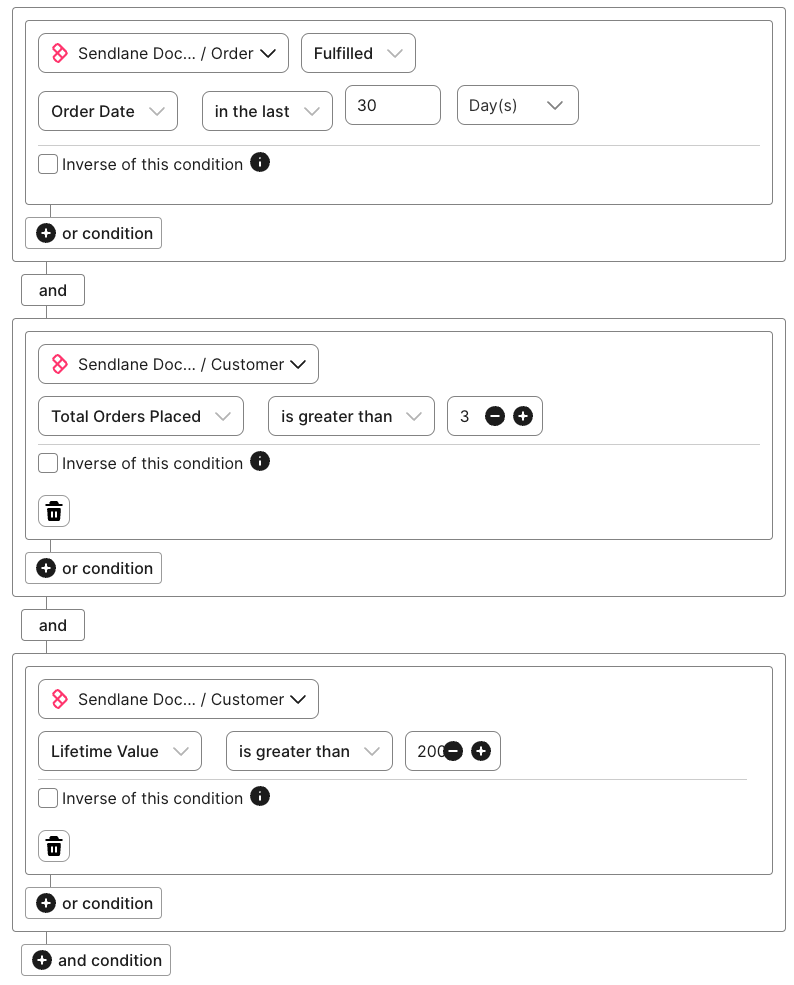
VIP - This segment will grab your most frequent, engaged, and high-spending customers. Our suggested setup are a general guideline; you should think about who your highest value customers are and adjust the segment accordingly. Segment setup:
Last purchase within 30 days
eCommerce integration>Order>Fulfilled>Order Date>in the last>30>Days, AND
3+ orders
eCommerce integration>Customer>Total Orders Placed>is greater than>3, AND
Lifetime value is greater than $200
eCommerce integration>Customer>Lifetime Value>is greater than>200.00
See example
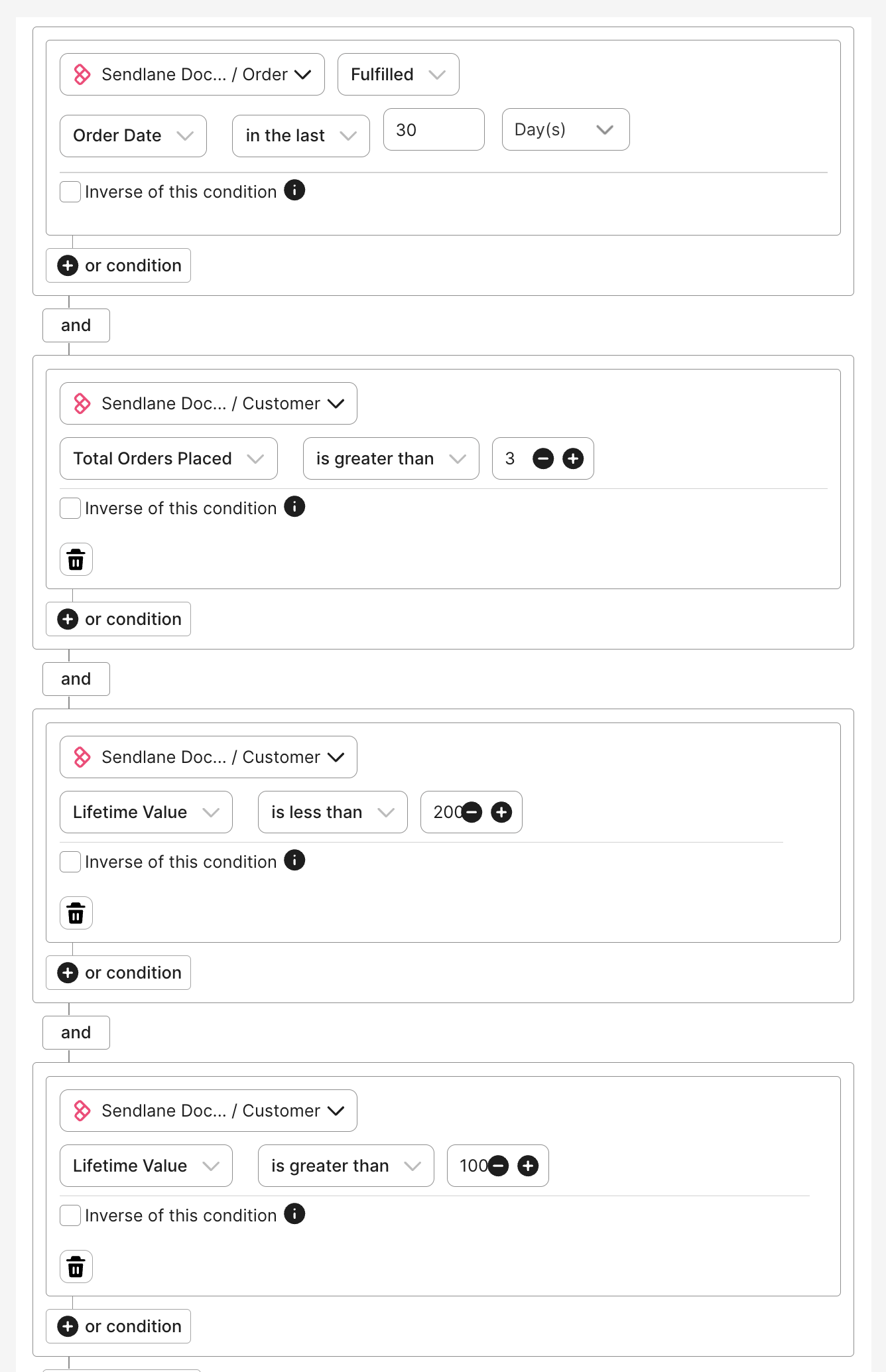
Fans - This segment will grab contacts who have placed multiple orders overall and at least one recent order but aren't quite VIPs yet. Segment setup:
Last purchase within 30 days
eCommerce integration>Order>Fulfilled>Order Date>in the last>30>Days, AND
3+ orders
eCommerce integration>Customer>Total Orders Placed>is greater than>3, AND
Lifetime value is less than $200
eCommerce integration>Customer>Lifetime Value>is less than>200.00, AND
Lifetime value is greater than $100
eCommerce integration>Customer>Lifetime Value>is greater than>100.00
See example
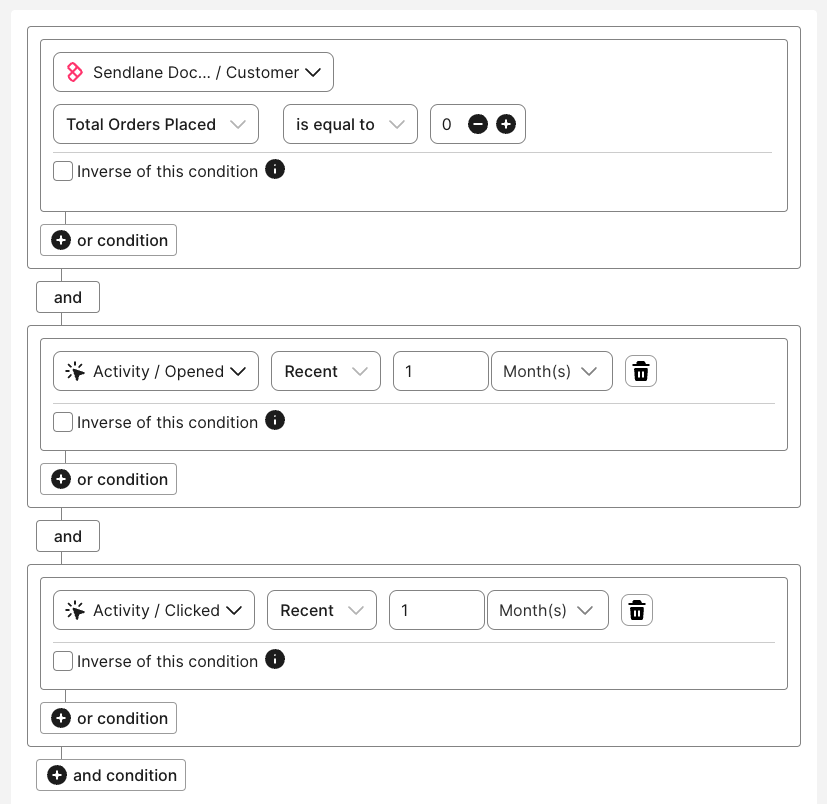
Window shoppers - This segment will grab contacts who frequently interact with your content but haven't made a purchase. Segment setup:
No purchase history
eCommerce integration>Customer>Total Orders Placed>is equal to>0, AND
Opened an email in the last month
Activity>Opened>Recent>1>Month, AND
Clicked in an email in the last month
Activity>Clicked>Recent>1>Month
See example
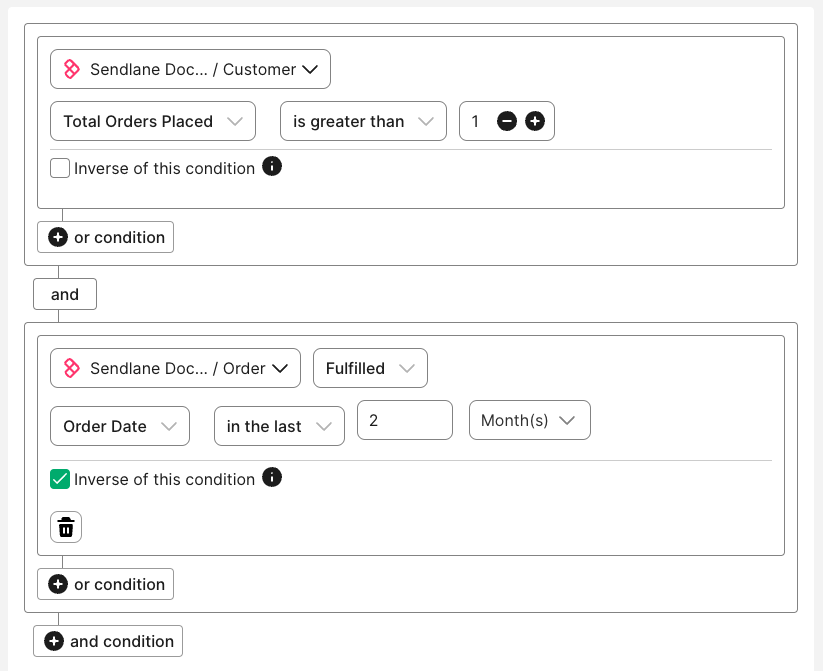
At risk - This segment will grab customers who have placed multiple orders, but haven't ordered recently. Segment setup:
eCommerce integration>Customer>Total Orders Placed>is greater than>1, ANDeCommerce integration>Order>Fulfilled>Order Date>in the last>2>months>Inverse of this condition
See example
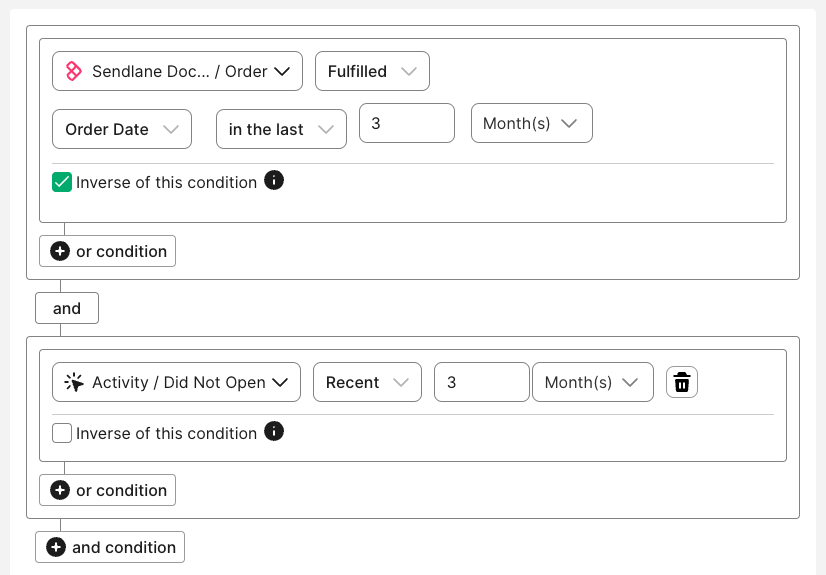
Lapsed - This segment will grab customers who haven't placed an order for a longer period of time. Segment setup:
eCommerce integration>Order>Fulfilled>Order Date>in the last>3>months>Inverse of this condition
If your business doesn't expect customers to repeat purchases very frequently, you can add an optional condition to check for engagement with your content to tighten this segment:
Activity>Did Not Open>Recent>3>Months
See example
Content suggestions for RFM based campaigns
Use the table below for inspiration for your RFM segments' campaign content, and make sure to use experiments to collect valuable data about what each group responds to.
Segment | Goal of segment | Content recommendations |
VIP | Retain loyalty, increase lifetime value, inspire to become evangelists |
|
Fans | Retain loyalty, encourage larger orders |
|
Window shoppers | Incentivize first purchase |
|
At risk | Reignite interest before churn |
|
Lapsed | Recover the customer or clean them from your audience |
|
Monitor RFM performance
Once you start campaigns tailored to each RFM segment, it's essential to monitor performance and iterate based on results.
Here are the metrics to track success across VIP, At-Risk, and Lapsed customer groups and questions to ask yourself as you review campaign reports.
Open Rate: Are your subject lines and pre-headers resonating with each segment?
Click-Through Rate (CTR): Is the content driving engagement?
Revenue Per Email Sent (RPES): Which segments are delivering the most ROI?
Unsubscribe Rate: Are certain segments being over-messaged?
Reactivation Rate (for At-Risk and Lapsed): Are customers returning after receiving targeted campaigns?