How to activate SMS
Last updated: April 28, 2026
Overview
Sendlane's SMS packages allow you to add SMS marketing to your existing email marketing strategy quickly and seamlessly! Use both together to leverage customer behavioral data to send the right message at the right time.
Important notes regarding SMS activation
SMS carriers are experiencing higher than normal wait times in approving phone number applications; the registration process currently takes up to four weeks.
SMS activation is only available for businesses with registered addresses in the United States.
SMS messaging on shortcodes is only available to phone numbers located in the United States or Canada; SMS messaging on a toll free number is available to phone numbers located in the United States, Canada, and Puerto Rico
Your privacy policy must include your business's data storage and data usage terms. Your SMS application will not be processed without this information.
Step One: Review SMS opt-in information
To get started, head to the Billing tab of your Account Settings page, then click Set Up SMS.
Read the SMS Consent / Opt-In agreement and restricted content information carefully before checking the box and clicking Continue.
Step Two: Register your phone number
Sendlane works with carriers to verify that your phone number belongs to your business by registering your brand.
Enter your company’s information including your industry, legal entity name, and business address.
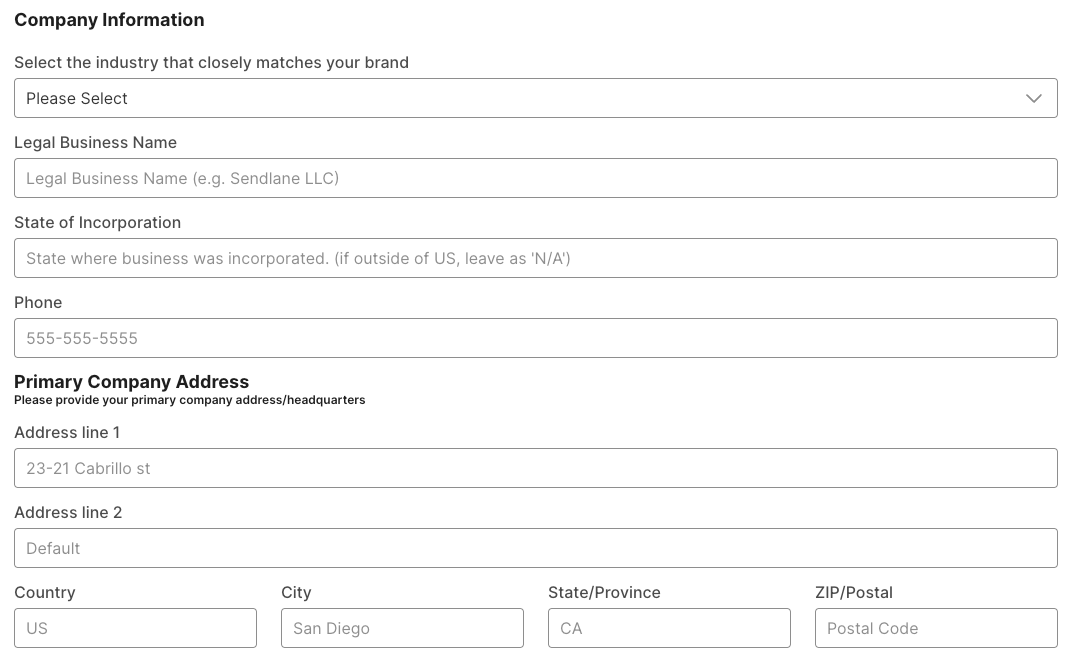
Next, you’ll set up how your business is identified in marketing SMS messages and provide links to your business’ privacy policy and terms of service.
Business Name will be added to all of your SMS messages (and will count toward’s the message’s character count) to identify you to your Contacts.
Subdomain will be used in tracking links to identify your brand to your Contacts and cannot be changed. We recommend keeping your subdomain as short as possible. Subdomains cannot contain periods and cannot start or end with a dash.
Carriers want to know that you are following legal guidelines that protect consumers from unwanted marketing materials. Not having the proper legal language on every lead capture form and in your privacy policy your business uses can result in massive fines for violating TCPA.
Luckily, Sendlane has TCPA-compliant opt-in forms ready to go! If you are using any lead collection method other than Sendlane’s native Pop-Ups, upload a screenshot showing your lead collection page with the required legal language.
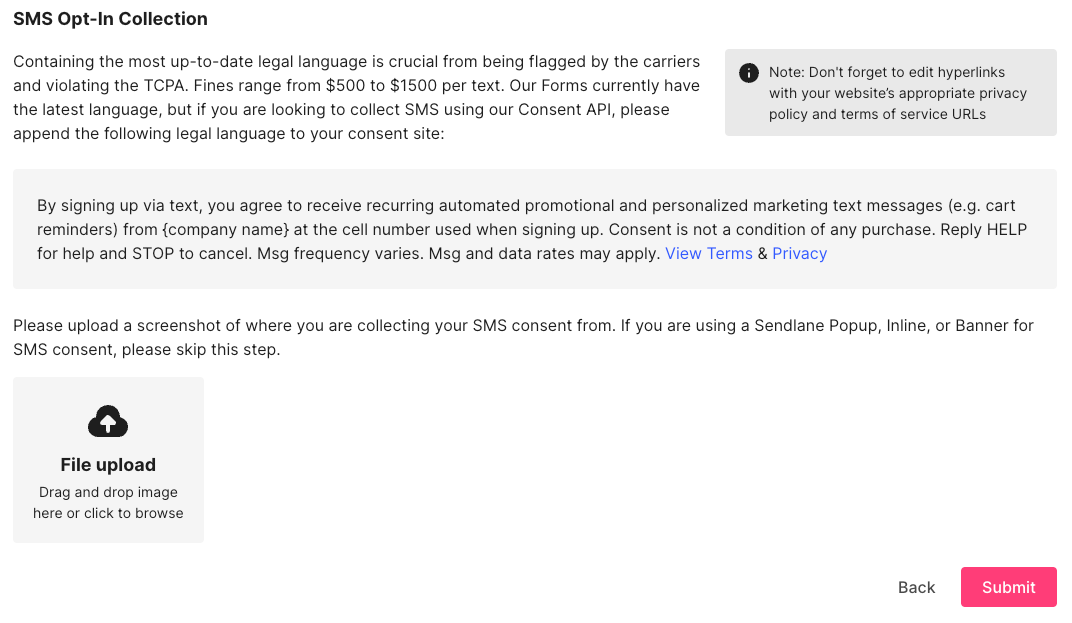
Click Submit to submit your form and begin the compliance review process! You'll receive an email from the Sendlane Compliance team on the status of your registration.
Step Three: Select an SMS plan
Once your SMS registration is approved, you’ll be automatically placed on our free trial SMS plan! The free trial plan gives you 50 SMS credits to send test messages and get familiar with the SMS workflow.
Important: While you receive 50 free SMS credits upon approval, you must select a paid SMS plan before you can send campaigns. Campaigns will show a "Stopped" status until a paid plan is selected. Your remaining trial credits will be added to your chosen plan.
To select your SMS plan:
Click the Account icon
Click Billing
Click SMS Plans
Select a plan from the dropdown
Click Choose Plan under the annual or monthly billing agreement
Not sure which plan to pick? 10% of your audience size x 4 messages per month is a good place to start!
Next steps
Check your inbox for an email from our compliance team informing you of the outcome of your application!
If you need to port your phone number over from an existing SMS solution, please reach out to your customer success manager or Sendlane support!
Disclaimer: The information provided in this article does not, and is not intended to, constitute legal advice. All information, content, and materials available in this article are for general informational purposes only.