How to open a form programmatically and listen to form events
Last updated: March 11, 2025
Overview
You can create custom triggers for your form enabling you to open a form programmatically with JavaScript.
We also provide the ability to listen to form activity events, enabling you to be notified when a user has taken actions related to the form using JavaScript.
Custom triggers cannot be created for legacy forms
How to find a form’s key
To create a custom trigger for a Sendlane Form, you will need the form’s key in its installation code. To find a Sendlane Form’s key:
Open the form
Click Design
Click Summary
In the left sidebar, locate the Form Installation Code
In the Form Installation Code window, copy the value inside the quotation marks for
form_key
Form events
Sendlane Forms send an event called sendlaneForms to the window each time activity occurs on a form. The Sendlane form event gets dispatched like the following code example. See the object for a sample event payload:
const event = new CustomEvent("sendlaneForms", {
    detail: {
        type: 'submit',
        form_key: 'ENTER_FORM_KEY_HERE',
        metaData: {
            email: 'test@example.com',
            // additional fields
        }
    }
});
window.dispatchEvent(event);
ENTER_FORM_KEY_HERE must be replaced with your form’s unique form key, found in the form installation code on the summary page of the form builder
The following event types are available for forms:
Event Description | |
| This event fires when an embedded form loads on a page |
| This event fires when a form initially displays on a page |
| This event fires when a visitor closes a form |
| This event fires when each step is submitted, and it can fire multiple times per form |
| This event fires when a visitor submits the main conversion action of a form (e.g., the first email or SMS subscription action), and will only fire once per form |
Form event listener structure
See the example below for the general structure of custom event listeners for form events.
The field open can be changed to any other form event type listed in the table above.
Replace Custom JS with the JavaScript that should run when the event occurs.
<script>
    window.addEventListener("sendlaneForms", function(e) {
        if (e.detail.type == 'open') {
            // Custom JS
        }
    });
</script>
Custom form trigger setup
You can create custom triggers for your form by:
Selecting “Only on custom trigger condition” for your form’s show options
Implementing the pusher.js library in your website’s code
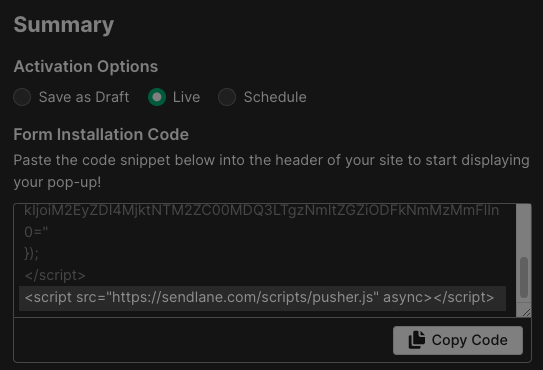
The pusher.js library is highlighted in each form installation code window as shown below. This script can cause issues if it is installed more than once on your site.
Using the library to trigger the
_Sendlane.openForm("form_key")function when your custom condition is met
Custom triggers will only work if “Only on custom trigger condition” is selected for your form’s show options.
You cannot select another show option and also implement a custom trigger.
Your custom trigger can include whatever parameters you’d like, such as only showing for certain visitors, on certain days, or when a button is clicked.
Let’s say you’d like to trigger your form to display when a button is clicked. First, you'll need to paste your form's installation code into your website. Then, you'll build your custom trigger by adding an onclick attribute to a button.
If you have an existing button you’d like to use to trigger a form, insert the following onclick attribute into your existing button element: onclick="_Sendlane.openForm('form_key')"
If you don’t have an existing button you want to use, you can use the following structure to create a button that opens a specified form:
<button onclick="_Sendlane.openForm('form_key')">
	Open Form
</button>
Your file should look something like this:
<!DOCTYPE html>
<html lang="en">
<head>
  <meta charset="UTF-8">
  <meta http-equiv="X-UA-Compatible" content="IE=edge">
  <meta name="viewport" content="width=device-width, initial-scale=1.0">
  <title>Document</title>

</head>

<body>
  <script>
window._Sendlane = window._Sendlane || [];
_Sendlane.push({
    form_key: "FORM_KEY"
});
</script>
<script src="https://sendlane.com/scripts/pusher.js" async></script>
  <h1>Form</h1>
  <button onclick="_Sendlane.openForm('FORM_KEY')">
	Open Form
</button>
</body>
</html>
Form reappearance after submission
There is no mechanism in place that will stop a form from reappearing after submission when your custom trigger conditions are met.
If you want to prevent your form from reappearing to website browsers who have already submitted it, you will need to build those conditions into your form.