How to import Yotpo reviews
Last updated: March 14, 2025
Overview
If you’re migrating to Sendlane Reviews from Yotpo, you can bring your hard earned reviews with you! Read on to learn how to import your Yotpo reviews to Sendlane.
1. Export reviews from Yotpo
Follow these instructions for exporting your product reviews from Yotpo. When your file is ready for download, save it somewhere easily accessible, like your desktop, and make sure it is saved as a .CSV file. Do not edit the file in any way.
2. Ensure your reviews file from Yotpo is formatted correctly
Yotpo sometimes provides different header columns based on the version of the app being used. If header columns do not exactly match Sendlane Reviews’ import tool, the import will fail.
Open your Yotpo file using the spreadsheet software of your choice and compare your column headers to the table below.
Accepted Yotpo Headers ✅ | Yotpo Header Variations ⚠ |
| id |
| published |
| review_title |
| review_content |
| review_score |
| date |
| product_id |
| product_title |
| display_name |
| |
| comment_content |
| comment_public |
| comment_created_at |
| published_image_url |
The headers on my Yotpo export match the accepted Yotpo headers!
If your headers exactly match the headers in the Accepted Yotpo Headers column of the table above, awesome! You’re almost ready to proceed with importing your reviews file. Save your file as .CSV, then proceed with uploading your file.
The headers on my Yotpo export DO NOT match the accepted Yotpo headers!
No worries! You’ll need to replace your export’s headers and add an Order ID column before proceeding:
Replace any headers that do not exactly match the Accepted Yotpo Headers column in the table above
Add a header labeled
Order IDand leave the column blankSave your file as .CSV
Once you’ve completed the steps above, proceed with uploading your file.
3. Import reviews file to Sendlane
To import your review file:
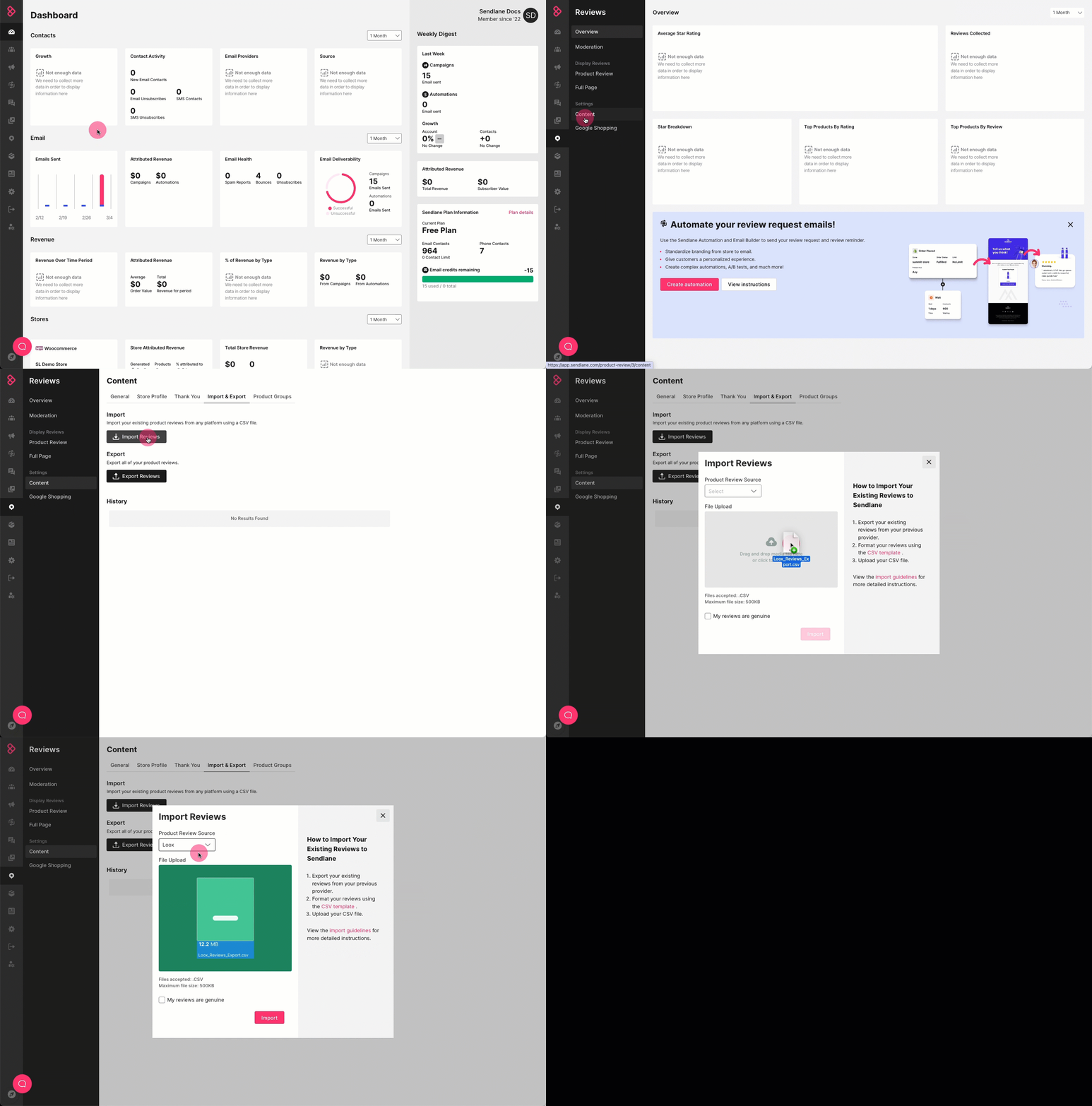
Click the Reviews icon
Click Content
Click Import & Export
Click Import Reviews
Select Okendo from the Product Review Source dropdown
Drag and drop your .CSV file or click to browse for your file
Check the checkbox confirming that your reviews are genuine
Click Import